Quoting software vs spreadsheets
Most fab shops start with spreadsheets. They work — until they don't. An honest look at when spreadsheets still make sense, where they break down, and what dedicated quoting software actually gives you.
Most fab shops start with spreadsheets. They work — until they don't. An honest look at when spreadsheets still make sense, where they break down, and what dedicated quoting software actually gives you.
Almost every fabrication shop starts the same way. Someone builds a spreadsheet — usually in Excel, sometimes Google Sheets. It has a few columns: part name, material, thickness, quantity, price. Maybe a tab for material costs and another for machine rates. It works well enough for the first year or two.
There is nothing wrong with this. Spreadsheets are free, flexible, and everyone knows how to use them. For a one-person shop doing five or ten quotes a week, a well-organized spreadsheet is a perfectly reasonable tool. No learning curve, no subscription, no software to set up.
The problems do not show up on day one. They creep in slowly as the shop grows, adds people, takes on more customers, and handles more complex work. By the time the problems are obvious, they have already cost you money.
Spreadsheets are general-purpose tools. They were not built for quoting fabrication jobs, and eventually that shows. Here are the specific ways they fall short:
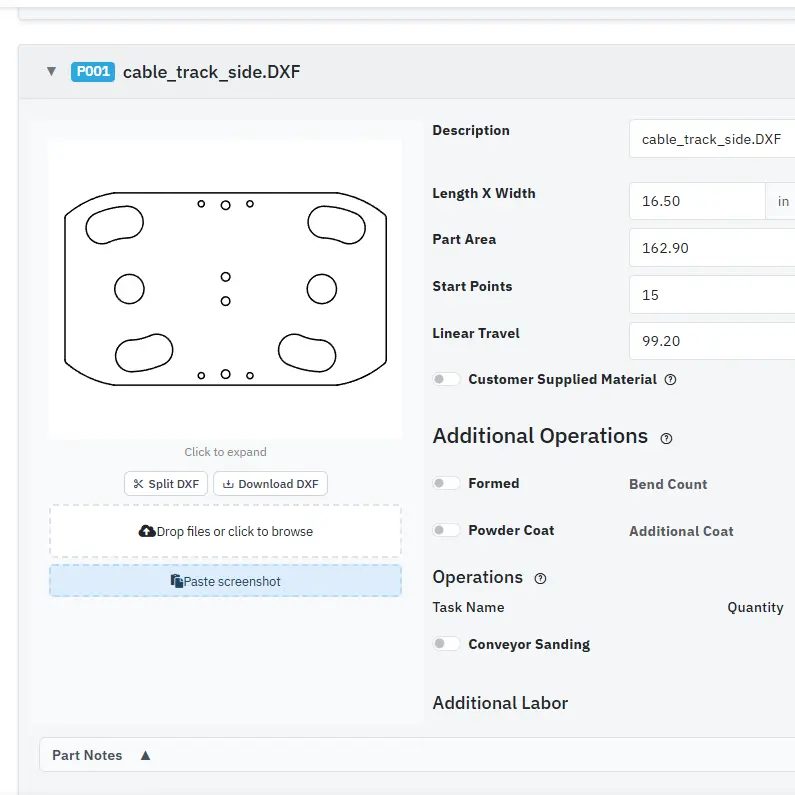
Spreadsheets cannot read a DXF file. Every time a customer sends a drawing, someone has to manually measure cut lengths, count pierces, and calculate part dimensions. This is slow, error-prone, and completely unnecessary with modern quoting software that extracts this data automatically.
When two people open the same spreadsheet on a shared drive, someone is going to overwrite someone else's work. Even with Google Sheets, there is no structured history of who changed what pricing and when. Did the material costs get updated last week, or was that the old version? Nobody is sure.
A single deleted row or copied formula can break an entire pricing sheet, and you might not notice for weeks. Complex spreadsheets with nested IF statements, VLOOKUPs, and cross-tab references are one accidental edit away from producing wrong numbers silently. Unlike a software bug that throws an error, a broken spreadsheet formula just gives you a wrong answer that looks right.
Material prices live in a tab that someone has to manually update. Different estimators might have different versions. When steel prices jump 15% in a month, some quotes go out with old prices and some go out with new ones. The customer gets inconsistent pricing, and you either eat the margin or look unprofessional.
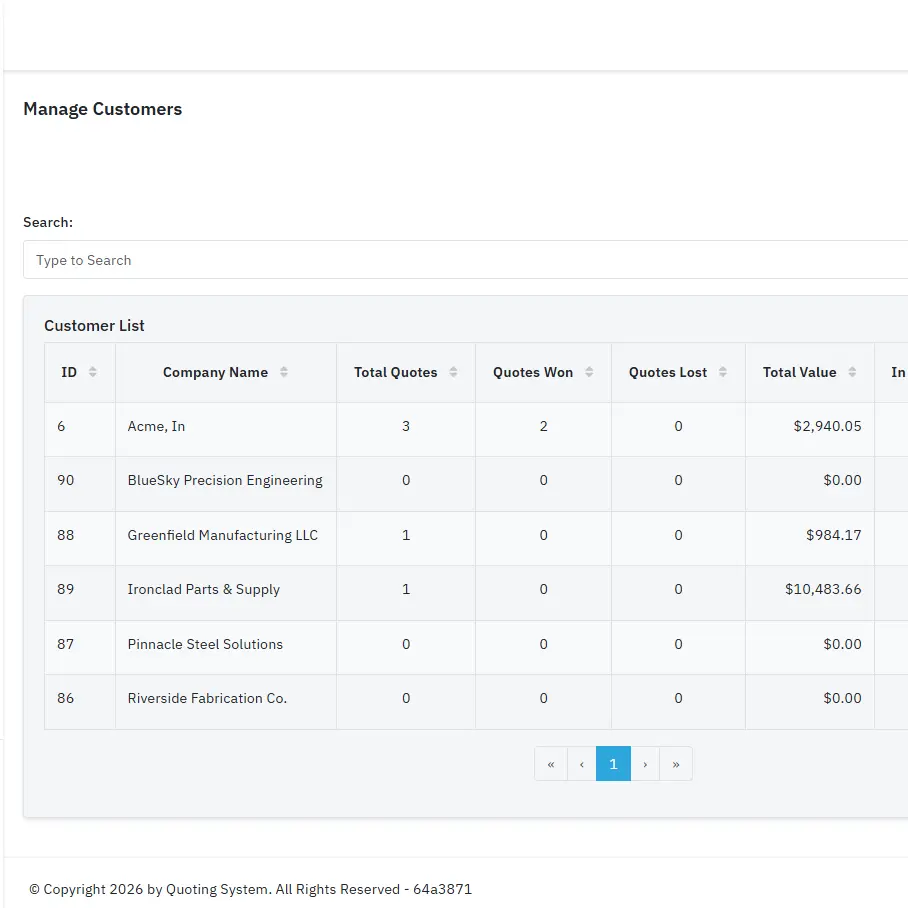
A customer calls and asks "what did you quote me on that bracket job in March?" With a spreadsheet, you are digging through email, searching file folders, or guessing. With quoting software, you type the customer name and see every quote you have ever sent them.
Every quote starts from scratch. Copy the template, fill in the parts, look up material costs, calculate cut times, add markup, format the output, email it to the customer. Each step is manual, each step is a chance for error, and each step takes time you could spend on higher-value work.
Every pain point above has a solved version. Two examples of what that looks like in practice.
Drop a DXF into the platform and cut length, pierce count, and part dimensions come back in seconds. The spreadsheet flow — open the drawing, measure each cut, count pierces, type the numbers — is gone. Attach the DXF, the PDF print, and any reference images to the part so the whole job lives in one place instead of three folders.
A customer calls about the bracket job you quoted in March. In a spreadsheet that's an email search and a guess. In Accuracy Quoting, you type the customer name and see every quote, every revision, and every price you've ever given them — plus the parts and DXFs that went with each one. Repeat orders get quoted in minutes from prior work instead of rebuilt from scratch.
How spreadsheets and quoting software compare on the capabilities that matter most.
| Capability | Spreadsheets | Quoting software |
|---|---|---|
| DXF file analysis | Manual measurement from drawing | Automatic cut length and pierce extraction |
| Material pricing | Copy/paste from supplier sheets | Centralized database, update once |
| Pricing consistency | Depends on who builds the sheet | Same formulas, every estimator |
| Quote to work order | Separate process, retype data | One-click conversion |
| Cost breakdown | Buried in formulas and tabs | Itemized on every quote |
| Customer history | Search through email and folders | Complete quote history per customer |
| Multi-user access | Shared drive conflicts | Role-based access, real-time |
| Cost to start | Free (plus your time) | $20/month |
To be fair, spreadsheets are not always the wrong answer. They work well when:
If that describes your shop, a well-maintained spreadsheet might genuinely be all you need. There is no reason to pay for software that does not solve a problem you actually have.
But most shops outgrow this stage faster than they expect. The first time you hire a second estimator, take on a customer with regular repeat orders, or need to quote a 50-line-item job with mixed materials and secondary operations — that is when the spreadsheet starts costing more in time and errors than software would cost in dollars.
If any of these sound familiar, your spreadsheet is costing you more than you think.
Different estimators quote the same job at different prices. Customers notice, and it does not build confidence.
You cannot quickly look up what you quoted a customer last time. You dig through email and old files instead.
Material price changes mean updating multiple spreadsheets across multiple computers. Someone always has the old version.
You do not know your actual margins until weeks after a job ships. By then it is too late to adjust pricing on the next order.
You are spending more time building quotes than running your shop. Manual DXF measurement and data entry consume hours every week.
Customers are waiting days for quotes that should take minutes. The slow turnaround is costing you jobs before you even get a chance to compete on price.
The most common objection to quoting software is "I do not want to pay for something I can do in Excel." That is fair — but it only looks at one side of the ledger. Here is the full picture:
If you spend 30 minutes per quote in a spreadsheet and you do 20 quotes per week, that is 10 hours per week or roughly 500 hours per year on quoting. At a shop rate of $50/hour for estimator time, you are spending $25,000 per year on the quoting process.
In our own internal testing, Accuracy Quoting cut quoting time by roughly 40% compared with our old spreadsheet process. At 40%, you save 200 hours per year, worth $10,000 in labor. The software costs $240 per year.
How many jobs per year go out with a pricing error? Maybe a wrong material cost, a missed secondary operation, or a formula that pulled from the wrong cell. If one out of every twenty quotes has an error, and each error costs an average of $200 in margin — that is $500 per year on just 20 quotes a week. Shops quoting more volume lose proportionally more.
Quotes that take two days to turnaround lose to shops that respond in two hours. You will never know exactly how many jobs you lost because your quote arrived too late. But if faster quoting wins even one extra job per month, the software has paid for itself many times over.
Getting started takes less time than building another spreadsheet.
Add your materials, machine rates, and markup rules. Base setup takes about 30 minutes, longer as you add modules. Your pricing logic is configured once and used on every quote going forward.
Upload DXFs or enter parts manually. Your material costs and machine rates are already loaded. Build quotes in minutes instead of hours.
Every cost on the quote is itemized, so you know what the job should cost before it hits the floor. Add Work Orders and accepted quotes become work orders in one click.
Try Accuracy Quoting free for 5 days or 10 quotes, whichever comes first. No credit card required.